Thursday, 1 August 2013

Snap Camera HDR v3.4.0 Beta 3 apk

Snap Camera HDR v3.4.0 Beta 3 Patched
Requirements: 2.3.3 and up
Overview: The best possible camera experience with regular updates and new features added all the time.
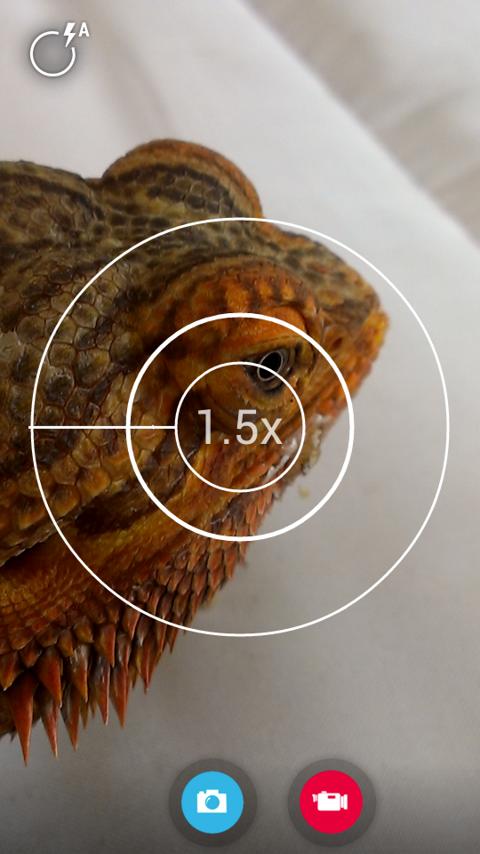
Snap Camera HDR - screenshot
A Fast HDR camera experience with regular updates and new features added all the time.
Now with optional Android 4.3 style user interface
Snap Camera lets you take pictures and record video with a single click, no cluttered preview screen, just the two buttons you really need.
Snap Camera’s interface is based on the camera included in Android 4.2 (jelly bean) on the Nexus 4 but with many extra features.
If you want to test this camera before buying, please install the trial version..
The trial version has all the features of the paid app but will only start in Airplane mode.
Snap Camera has a simple, powerful user interface featuring:
* Touch to focus
* Pinch to zoom
* Swipe to review
* Long press to adjust photo settings with the photo controller.
The photo controller includes settings for:
* Colour and Contrast (if supported by the hardware).
* Silent Shutter
* Burst Mode
* Self Timer
* Stable Shot
* Panorama mode
* Flash mode
* Whitebalance
* Exposure
* Grid lines
* Fast picture mode
* HDR
* Additional Settings
The additional settings menu gives you access to many extra settings.
* Picture and Video Size
* Scene mode
* Self Timer delay
* Burst Mode settings
* Time Lapse
* Still and Video Focus Modes
* JPEG Quality
* Effects
* ISO
* Anti-banding
* Scene Detection
* Video Bitrate, Format and Codec
* Audio Settings
The photo editor lets you:
* Add colour effects
* Add a border
* Crop, Rotate, Mirror
* Straighten
* Add image effects
* Histogram Modification
* Vignette
Additional Features
- You can see what effects will be applied and undo an effect at any time from the history menu
- Share an image with any other app such as Facebook or Google+ by clicking on the share icon
- Create panoramas by selecting the panorama icon (Android 4.0 and above)
- Fast picture mode instantly captures photos at the preview resolution.
- Capture still snapshots during video recording (if supported)
- Use the volume buttons to focus and take a picture or zoom
- Auto torch mode for low light video recording
- Use the advanced video settings to record video in resolutions not allowed by other cameras. For example, this gives you 720p video recording on the Nexus 7.
- Stable shot mode only takes a photo when the camera is completely still,
High Dynamic Range (HDR)
HDR is a feature that lets you take pictures of scenes with very dark and very light areas. Swipe up on the controller to enable HDR mode. The app takes two photos at different exposures and combines them to make one HDR photo.
See here for details of HDR:
Refunds:
Please contact us if you have any issues with Snap Camera, we will give you a refund and later notify you once we’ve fixed the problem.
Snap works best on newer phones but will still run on older models.
Some features are only available on phones that support them.
Camera apps are notoriously difficult to make compatible with all hardware.
Please install and test the trial version first before you buy the paid app.
Please visit our website for tips and more details about the settings and features.
There is a discussion forum here:
Please use this to report bugs, ask questions and suggest new features. Remember to say which device you have and which Android version it is running.
This app will install 2 icons in your launcher, one for the Gallery and one for the Camera. Some launchers also put the Gallery icon on your home screen.
If video recording does’t work on your device, try these suggestions:
Check out our great video to see Snap Camera in action.
What’s in this version:
3.4.0b3:
Allow focus mode to be set from the controller (you need to add a custom icon the controller to do this)
Add ghost preview icon to custom set
Smoother selection for the controller


Apex Launcher Pro v2.0.6 Final apk

Apex Launcher Pro v2.0.6 Final
Requirements: Android 4.0+
Overview: Powerful, fast, and highly customizable home replacement for Android 4.0+.
Apex Launcher helps you create a customized homescreen experience on your Ice Cream Sandwich (Android 4.0) device.
Features:
- Customizable homescreen grid size and up to 9 homescreens
- Scrollable dock with up to 7 icons per page and up to 5 pages
- Infinite & elastic scrolling (homescreen, drawer and dock)
- Fancy transition effects (tablet, cube, etc.)
- Hide elements as you want (persistent search bar, status bar, or even the dock)
- Customizable icons and labels for shortcuts and folders
- Choose different folder preview styles and background
- Multiple drawer styles (transparent/opaque, horizontal/vertical, paginated/continuous)
- Drawer apps sorting (title, install date, mostly used)
- Hide apps from the drawer
- Lock your desktop to prevent accidental changes
- Enjoy homescreen gestures (pinch, swipe up/down, double tap)
- Backup/restore settings and data
- Optimized for both phones and tablets
- Lots of other customization options!
Apex Launcher Pro (Paid Version) Features:
- Multiple configurable drawer tabs
- Unread count notifications
- Dock swipe gestures
- Two finger gestures
- More transition effects
- Batch add option for folders
- Option to merge folder contents
- Widgets in dock (1×1 only)
- Overlapping widgets
- More features on the way!
Note: Due to limitations of the Android framework, you won’t be able to add widgets from the app drawer without root access. If your device is rooted, please enable the Root Helper via Settings > Advanced settings > Enable Root Helper.
Tips:
- Pinch the screen to access screen previews (like Exposé or HTC Sense).
- Long press an icon to drag and drop it over another one to create a folder.
- Long press icons/folders on the desktop and choose edit from the popup menu to customize icons and labels.
- Drag, hover, and drop app icons over the delete button at the top of the screen to quickly uninstall apps.
- Long press an app in the hide apps list to quickly launch that app.
- Switch to single screen wallpaper mode to fix wallpaper zooming issues.
- Enable the Root Helper in advanced settings (root required) to add widgets from the drawer.
Permissions:
- BIND_APPWIDGET: Required to add widgets from the drawer (only if installed as system app).
- CALL_PHONE: Create direct-dial shortcuts on the homescreen.
- EXPAND_STATUS_BAR/SET_WALLPAPER/SET_WALLPAPER_HINTS/VIBRATE: Standard launcher functions.
- INTERNET/ACCESS_NETWORK_STATE: Check for updates and anonymous usage/error reporting (optional).
- WRITE_EXTERNAL_STORAGE: Backup/restore settings and data.
- READ_CONTACTS/READ_SMS/GET_ACCOUNTS/READ_CONTENT_PROVIDER: Missed call and unread SMS/Gmail notifications (pro version).
This is patched version, fully unlocked pro functions.
If your ROM came with Apex Launcher you’ll have to remove it before installing this.
What’s in this version:
v2.0.6 (Jul 30, 2013)
Fixed search bar style in Android 4.3
Fixed folder label alignment issue
Updated translations

Calculator Plus v4.5 apk

Calculator Plus v4.5
Requirements: 2.3.3 and up
Overview: I’m Calculator Plus – the perfect calculator for Android. I’m easy to use and beautifully designed to do things better than your phone or handheld calculator ever did.
Calculator Plus - screenshot thumbnail
USA TODAY named Calculator Plus among its “25 essential apps”, calling it a “handy calculator app that’s garnered great user ratings” (10/6/2012)
I’m Calculator Plus – the perfect calculator for Android. I’m easy to use and beautifully designed to do things better than your phone or handheld calculator ever did.
I’m big, easy to read, and I love saving you time and effort. I remember everything you calculate, and let you review it anytime, making me perfect for shopping, doing homework, balancing checkbooks, or even helping with taxes. And if you need to quit and go do something else, I’ll have it all waiting for you when you come back. You’ll never need to type the same calculation twice again.
I’m attractive and effective and I make great use of your big, beautiful display:
- I show your calculations in clear, elegant type that’s easy to read, with commas just where they should be
- You’ll never lose track of where you are in a calculation – I show you exactly what’s happening at all times
- I remember everything, so you can take a break, then come back later and pick up where you left off
- You can use backspace anytime to correct a simple mistake, instead of starting over
- Use memory to keep a running total you can actually see
- Swipe memory keys aside if you need more advanced math functions
- My percentage key shows exactly what it did, so you’re not left confused
- My intuitive, lovable design makes it simple to do everyday calculations on your phone or tablet
What’s New
Check out our shiny new menu, for phones and tablets!

360 Mobile Security- Antivirus v1.2.0 apk

360 Mobile Security- Antivirus v1.2.0
Requirements: 2.2 and up
Overview: Protect your mobile device with 360 Mobile Security, a top of the line mobile security app designed to protect your Android phone against the latest viruses, malwares, system vulnerabilities and privacy leaks.
360 Mobile Security- Antivirus - screenshot
360 Mobile Security is lightweight, agile and Ad-free. Download our FREE app and find out what 275 million users have already discovered. Why pay for the so called premium security features? With just one click you’ll get the most advanced security features that the other guys make you pay for.
——————————————
>>Key Features and Benefits<<
★Scan & remove viruses
Utilize dual-layer protection to keep your system away from the latest threats with the 360 QVS + cloud engines
★Real time protection
Scan installed apps and local apk files in real time while monitoring each installation process.
★Privacy advisor
Serve as your guide to keep you up to speed on what apps are accessing your data.
★System vulnerabilities fixing
Detect and fix vulnerabilities rooted in your mobile with verified hotfix.
——————————————
360 Mobile Security is certified by accredited third-party test agencies including West Coast Labs, AV-Comparatives, AV-TEST, PC Security Labs, and SKD Labs.
360 Mobile Security is available in following languages: English, Portuguese (Brazil), Portuguese (Portugal), Spanish (Spain), Spanish (Latin America), Russian, Chinese (Simplified), Chinese (Traditional).
>>We would like to hear from you <<
Like us on Facebook:
Search 360 Mobile Security using the following keywords: 360, Mobile Security, Antivirus, Privacy Advisor, Privacy Protection, Cloud Scan, anti virus, anti-virus, security, mobile privacy, virus, Trojan, malware, spyware, backdoor, virus protection, smartphone security, mobile protection,Samsung Galaxy S4.
Download 360 Mobile Security for free other than buy Avast, AVG, Kaspersky, Lookout, Norton, NQ, Trustgo and other paid security apps. See how beautiful and quick we are but others are not.
What’s New
1. Your notification drawer now comes with multiple functions. Set alarm clocks, turn on the flashlight, go to the recents screen and boost your device from the notification drawer. (For Android 4.0 and up)
2. An upgraded antivirus engine now scans for threats and potential threats.
3. For our Turkish users, a Turkish version is now available, thanks to Mefkud Hüseyin ŞEVİKBAŞ!
4. Several bug fixes.

Math Helper v3.0.31 apk

Math Helper v3.0.31
Requirements: 2.1+
Overview: Universal application of higher mathematics, which helps you not only to solve the problem, but also to see and understand the process of solving it, step by step.
Math Helper - screenshot
A COMPREHENSIVE AND UNIQUE CALCULATOR!
MathHelper’s marks of quality and excellence:
– The application is included in the Intel ® Learning Series Alliance software packs
– It is rated above 4.9 on Google Play with many positive reviews.
Here are just a few user reviews:
> “Perfect companion for the challenges on the linear and probability theories!”
> “Thanks to the authors, for a nominal fee I bought the app without thinking, it will probably cost more for the test for mathematics”
> “Great app. I bought it and don’t regret it. ”
This application is a universal assistant for those who deal with advanced mathematics. You can be a higher school student, a university student or even a graduate – If you need immediate mathematical assistance – MathHelper is always at hand!
You can forget about all the heavy books and numerous tricks with the tips, which in most cases do not guarantee that you’ll solve your maths problem.
MathHelper enables you to not only to solve the problem, but also to understand the process of solving it, step by step. This convenient multifunctional calculator includes an extensive theoretical guide in several languages. You’ll get an algebraic mini-laboratory that is stored conveniently and compactly on your Android!
Now, you can not only quickly find the answer, but also handle similar problems in the future. Your classmates and teachers will be very surprised with the results of your work.
MathHelper is indispensable during your math exams! And even if you have already grown out of school uniform and student’s jeans, you can always use a universal mathematical reference book calculator!
MathHelper allows calculating propositions and solving problems in linear and vector algebra in six sections at the moment:
1. Operations with matrices:
* Transpose of a Matrix
* Finding the determinant of a Matrix
* Finding the inverse of a Matrix
* Addition and subtraction of matrices
* Matrix multiplication
* Scalar multiplication of Matrices
* Calculating the rank of a matrix
2. Solving systems of linear equations:
* The Gauss method
* The Cramer’s method
* The Inverse Matrix method
3. Vectors:
* Finding the length (magnitude) of a vector
* Checking if two vectors are collinear
* Orthogonal vectors
* Sum, difference, scalar product
* Finding the cross product
* Finding the angle between two vectors
* Finding the cosine of the angle between two vectors
* Finding the projection of a vector onto another
* Coplanar vectors
4. Figures:
* Finding the area of a triangle
* Show that four points lie on the same plane
* Finding the volume of a tetrahedron (pyramid)
* Finding the volume and height of the tetrahedron (pyramid)
NEW! 5. Mathematical analysis – Derivatives:
* Derivative of the function
* Derivative of the function given parametrically
* The derivative of the implicit function
6. Probability theory:
* Finding expectation sample
* Finding the sampling variance
* Finding the number of permutations of a set of n elements
* Finding the number of placements and combinations (n, k)
7. Number theory and sequence:
* Prime factorization
* Finding GCD and LCM
* The least common multiple and greatest common divisor
* Complex numbers: Addition, subtraction, multiplication and division
* Raising a complex number to a power
* The first terms of a progression (arithmetric and geometric)
* Finding Fibonacci numbers
* Solution of linear Diophantine equations
* Finding the values of Euler’s function
* The factorial n!
Learn math in a new way with MathHelper!
What’s New
3.0.30:
- Function plotting problem was added
- Numerous bugfixes
- pt-BR localization added
- About page now have version number

Poweramp Music Player v2.0.9-build-530 apk

Poweramp Music Player v2.0.9-build-530 FULL version
Requirements: 2.1 and up, Rooted
Overview: Powerful Music Player for Android. Poweramp is a powerful music player for Android.
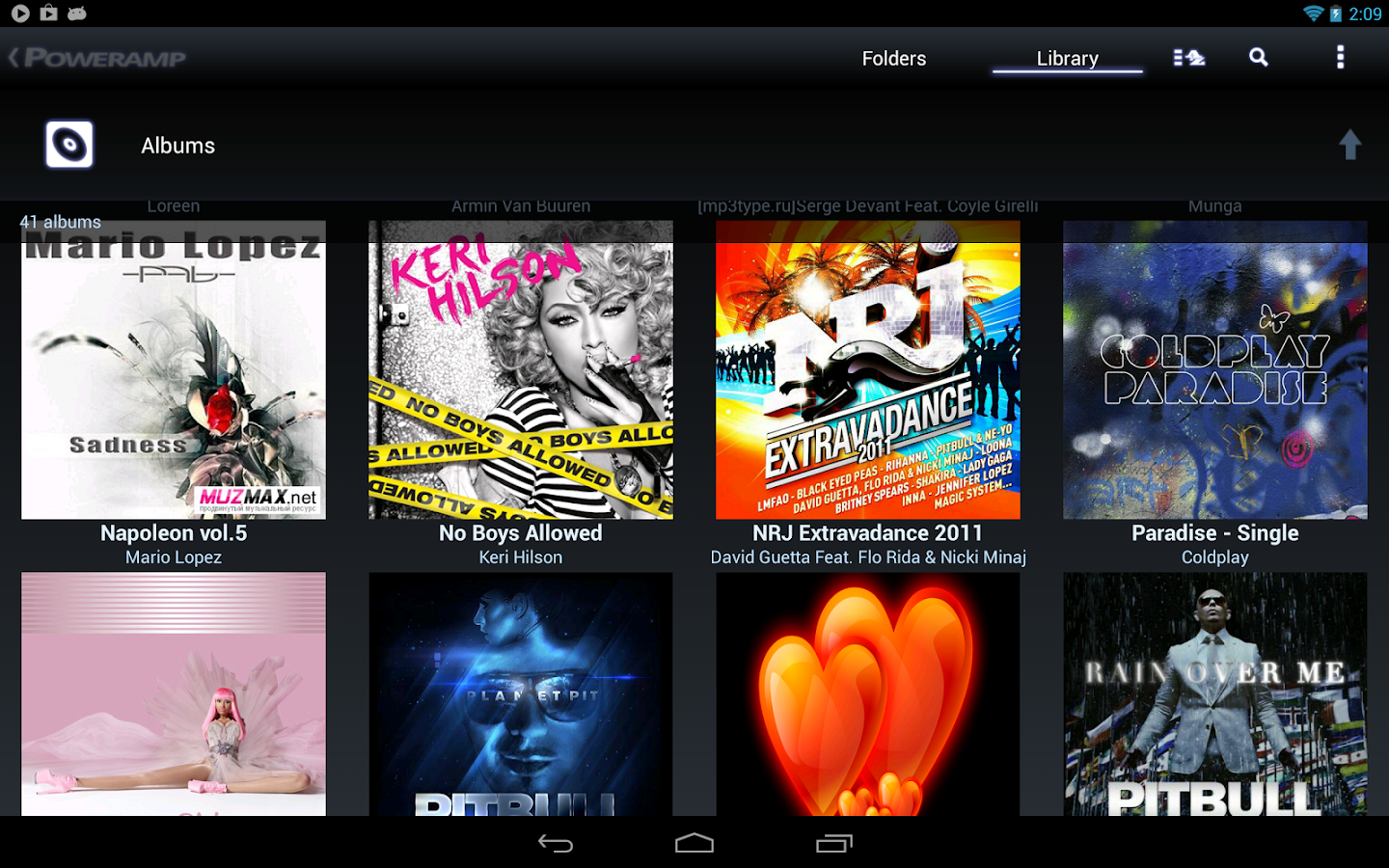
Poweramp Music Player (Trial) - screenshot
Follow us on twitter @Poweramp2 to get instant updates on app development progress, feature spotlight, theme sharing, take part in giveaways and even chances for free copies of Poweramp.
Please check Common Questions/Answers below in the description.
Key Features:
- plays mp3, mp4/m4a (incl. alac), ogg, wma*, flac, wav, ape, wv, tta, mpc, aiff (* some wma pro files may require NEON support)
- 10 band optimized graphical equalizer for all supported formats, presets, custom presets
- separate powerful Bass and Treble adjustment
- stereo eXpansion, mono mixing, balance
- crossfade
- gapless
- replay gain
- plays songs from folders and from own library
- dynamic queue
- lyrics support, including lyrics search via musiXmatch plugin
- embed and standalone .cue files support
- support for m3u, m3u8, pls, wpl playlists
- OpenGL based cover art animation
- downloads missing album art
- 4 widget types with many selectable styles, advanced customization; Android 4.2 lock screen widgets
- configurable lock screen
- headset support, automatic Resume on headset and/or BT connection (can be disabled in settings)
- scrobbling
- tag editor
- visual themes, including support for external/3rd party skins
- fast library scan
- high level of customization via settings
This version is 15 days full featured Trial. See Related Apps for Poweramp Full Version Unlocker or use Buy option in Poweramp settings to buy Full Version.
====
Common Questions/Answers for Poweramp v2.x:
Q. My songs are missing from folders/library.
A. Please ensure you have all your folders with music actually checked in Poweramp Settings => Folders and Library => Music Folders.
Your original Android Library is not changed, nor any files deleted.
Poweramp library is a separate, completely independent library. When you installed Poweramp 2.0, it just got filled with the files scanned from your sd card/other flash memory, as specified in Music Folders.
Q. Volume too low. Volume changes weirdly. Other volume issues.
A. Try to disable Direct Volume Control in Poweramp Settings => Audio => Advanced Tweaks.
Poweramp 2.x uses Direct Volume Control by default on 2.3+ mid-to-high end devices. On stock ROMs this produces much better audio output. But many custom/buggy ROMs, while supporting DVC, can fail with it.
Q. Can I get Poweramp v1.4 look?
A. You can download “Poweramp Classic Skin” on Market.
What’s in this version:
- 530: Action Bar on bottom option not supported anymore for Android 4.3
- 530: fixed few other Android 4.3 related issues
- 530: translations added/updated
Tutorial:
1.) Install GooglePlay.Installer.apk
2.) Run “Installer cracked GooglePlay” and press “Install and Reboot”.
3.) Enable Internet.
4.) Install PowerAMP Unlocker.apk
5.) Install PowerAMP v2.0.9.apk
6.) Run PowerAMP. Done.

Tuesday, 30 July 2013

PowerLine FULL v1.7 apk

PowerLine FULL v1.7
Requirements: 2.1 and up
Overview: PowerLine - smart line-indicators in your status bar. Battery, CPU, memory, signal, storage, SMS, missed calls and more...

Better than a widget! Always visible, even on the lock screen.

FREE version with two indicators, more indicators with the Unlock.

What's in this version:
1.7
- notification icon is now lowest priority
- as of 4.3 the notification cannot be fully removed, but at least the icon may be hidden due to low priority
- fix for multiple indicators of the same type - especially several decorations may be used at once
- fix for FC on some 3.0 firmwares
- German translation - many thanks to Mirco
1.6
- new color picker with transparency setting, copy and paste
- line value may be inverted
- option to force not hide certain indicators in full screen

This app has NO advertisements

More Info:
Code: 

Nandroid Manager Pro v1.2.2 apk

Nandroid Manager Pro v1.2.2
Requirements: 2.0 and up
Overview: So what is Nandroid Manager? Well Nandroid Manager is the ultimate tool for managing all of your nandroid backups!

With Nandroid Manager you can restore data from your nandroid such as apps+data, text messages, call logs, and much more!

Also with Nandroid Manager not only can you restore data from your nandroid backups but you can also flash new recoveries and use tools like fix permissions.

Nandroid Manager currently supports nandroid backups created by TWRP and Clockworkmod (v5.xx and v6.xx) based recoveries!

THIS APP REQUIRES THAT YOUR DEVICE IS ROOTED AND YOU HAVE BUSYBOX INSTALLED!

Current Features:
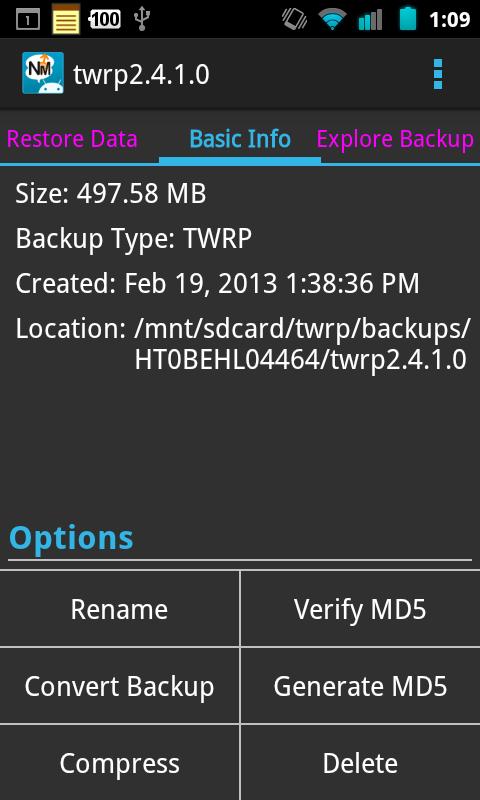
* View basic info about your nandroid backups.
* Explore contents of nandroid backup.
* Extract files from nandroid backups.
* Support for yaffs2.
* Rename backup.
* Compress backup to zip.
* Delete backup.
* Verify and regenerate MD5 hashes for backups.
* Restore Apps+Data from backup.
* Restore Text Messages from backup.
* Restore Call Logs from backup.
* Restore WiFi Access Points from backup (Pro).
* Restore Bluetooth Data from backup (Pro).
* Restore User Word Dictionary from backup (Pro).
* Restore Browser Data from backup (Pro).
* Restore Nandroid Backup.
* Flash new recovery.
* Fix permissions tool.

Many more features to come in the future!

Planned Features:
* Convert backups between TWRP and CWM.
* Export data from nandroid backup so it can be restored on other devices.
* Restore Home screen data such as wallpaper, launcher, shortcuts, and widgets!

Support thread for this app: [APP][v1.2] Nandroid Manager - xda-developers

Known Issues: https://docs.google.com/document/d/1wUb ... sp=sharing
Todo List: https://docs.google.com/document/d/1ncj ... sp=sharing

Important info about restoring sms data:

There is a settings in the default Messaging app that deletes older messages from conversations which have more than 200 messages. When restoring1000s of messages this setting can cause a lot of problems because it keeps trying to delete messages when you try to open the conversation. If you are restoring lots of messages, then disable this setting by opening the Preferences of the Messaging app. On some devices it can take a long time to index the new message data. If you get a blank screen or if the phone asks you to “Force Close” or “Wait” when opening the messaging app just press “Wait” and leave the Messaging app running for a while. It will eventually finish and the app will become usable again.

What's New
Version 1.2.2
* Clicking Selected Apps when selecting apps to restore now shows you which apps you have selected and lets you easily removed apps from selected list.
* Restore Nandroid Backup feature has been improved.
* Improved Flash Zip(s) via Recovery feature.
* App now checks and-sec.vfat.win for asec apps.
* Improved path detection for twrp based backups.
* Improved compare method of folders to fix problem of app adding the same TWRP or CWM folder with different paths.

This app has NO advertisements

More Info:
Code: 

Weather + Widgets + Instashare v2.2.5 apk

Weather + Widgets + Instashare v2.2.5
Requirements: Android 2.2+
Overview: Fantastic Widgets in HD + professional weather App with 3-day forecast + InstaShare (Share your pictures on with weather info on it) + Daily weather notification!

+ Features, available on subscription: 10-day forecast, moon phase, radar, and more!
Includes InstaShare - Put weather on your photos and share on Facebook, Instagram, Twitter and other social networks!
Choose between 6 different Widgets, each skinnable with 10 different themes. Widgets include Digital Clock, special effects like rain drops or clouds, and weather forecast.
With just a touch the app enters "full screen mode" with beautiful weather HD animations and detailed forecast. Other features include detailed weather info, location-aware weather, weather by city name, and more.
Widgets include:
- 3 Different Premium Clocks with weather
- Homescreen widget with clock, weather, hourly forecast, 3-day forecast.
- Small Clock + weather
- Special effects (rain drops, sunshine, clouds)
- Each widget supports 10 different skins!
Main Weather App include:
- "Today" advanced weather data (pressure, humidity, visibility, cloud cover, precipitation)
- 4-day hourly weather forecasts (morning, mid-day, evening, night)
- Today Sunrise/Sunset time
- Full Screen Weather animations (night & day)
- data by World Weather Online
- Works with city name or GPS
Premium Widgets is the fastest growing weather app, with over 20 updates released in a few month. We are working hard to make it always better, we want it to be the best!
If you like this app, please leave a positive, 5 star review. It's really important and it will help us a lot!
If you have any question, contact us using the "support" button in settings. We will do our best to reply immediately!

What's New
- Widgets bug fix

- Daily weather notification
- InstaShare: take pictures with weather and share on social networks.

This app has NO advertisements

More Info:
Code: 

History Eraser Pro v5.1.2 apk

History Eraser Pro v5.1.2 *PAID*
Requirements: Android 1.6 and up
Overview: It's a history eraser for android device, and it can clean history of apps by only one tap. It's similar to the "ccleaner" on PC. It can help you to protect your privacy, and it can also help you to free up the internal storage. No root premission required!

Feature:
★Clear Browser History
★Clear Call Log
★Clear text messages
★Clear Market Search History (including new android market history of v3.0.26+)
★Clear Google Map Search History
★Clear Gmail Search History
★Clear Clipboard Data
★Clear Youtube Search History (assist)
★Clear Google Search History(Android >= 1.6) (assistance)
★Clear all app cache files
★Clear Frequently Called (Frequently Contacted)
Feel free to send feedback to us other than 1 star!!
If forceclose happens, please use our another app named 'App Cache Cleaner' to do a clean-all action, and then open History Eraser again
#How to clean your Google Map history
If your Google Map history still comes out after clean, please visit http://www.google.com/history to disable the history records for your Google account.

What's New
#5.1
1.improved ui
2.enhanced SMS/Calllog related functions
#4.4
new android 4.0 style UI
v4.3
fix a few bugs
v4.2

fix cache cleaner for android 4.2
v4.0.2
1. refresh cache size immediately after clear cache
2. remove localization of Nederlands

This app has no advertisements

More Info:
Code: 

Twitter Delicious Facebook Digg Stumbleupon Favorites More