Monday, 18 February 2013

3D Sense Clock & Weather v0.41

3D Sense Clock & Weather v0.41
Requirements: 1.6 and up
Overview: 3D Sense Clock & World Weather is a full featured, size 4×1, 4×2 and 5×2 fully customizable digital clock and weather forecast widget

This image has been resized. Click this bar to view the full image. The original image is sized 680x332px.

The widget features the following:
- World weather forecast application (no need to add a widget if you don’t want to; you can check out the weather forecast by opening the application)
- 3 widget sizes; 4×1, 4×2 and 5×2(for Galaxy Note or tablets)
- 12 skins to choose from
- Support for external theme packs containing even more skins (theme packs can be downloaded separately)
- 3 weather icon skins
- 6 fonts for the time
- 10 battery icon themes
- Portrait or landscape mode
- 12 or 24 hour clock with date
- Display of current week number
- Supports dynamic location (optional) – use this to automatically update your location and receive weather forecasts as you travel
- Weather conditions for current location (condition and temperature, low and high temperatures and weather icon)
- Detailed weather forecast display including the following:
- Local time
- Sunrise and sunset time for current location
- Humidity and wind conditions
- Current condition, temperature and low and high temperatures
- Current condition icon
- Last weather update time
- 4 day weather forecast
- World weather: Choose to display weather information for any number of different locations worldwide. Just select your favorite locations and you will immediately have updated weather and time information.
- Launch up to four different applications by tapping different widget hotspots (is user defined)
The widget can be fully customized with the following options:
- Choose the widget and weather icon skins
- Choose the text color for the time, am/pm indication, date, location, current weather condition, current temperature and hi/lo temperatures
- Display shadow on the time
- Choose the font for the time
- Display 12 or 24 hour time with optional AM/PM indicator (if 12 hour format)
- Beep every hour (optional)
- Select the date display format
- Display a manually selected location’s time instead of phone’s time
- Optionally show or hide specific elements of the widget (hi/lo temperature, weather update time, am/pm indicator, battery status, next alarm, etc)
- Use current location to display weather info or specify any location you want
- Get location updates from the network (cell/WiFi) or your GPS
- Display temperature values in Celsius or Fahrenheit
- Optionally display the next alarm (under the hour)
- Select automatic weather refresh period (15 minutes, 30 minutes, 1, 2, 3, 4 or 6 hours)
- Enter your favorite world locations to watch local times, current weather conditions and weather forecast information
- Update weather on WiFi and/or GPRS
- Choose whether you want to update while roaming or not
- Play notification sounds on location and weather changes and updates
- Select what application to launch when tapping the hours
- Launch more applications by tapping the weekday or month
- Optionally display the battery level
- Specify how to receive location updates (how often and for how much distance)
- Select alternate weather forecast service
IMPORTANT!!!
- This is a widget, not an application. To install it please refer to the help display when you run it. There is also a link to a video that shows you how to install it.
- If you are using a task killer exclude the widget from it
What’s in this version:
- [new] Added option to refresh location on Internet connection
- [new] Added option to set different color for high and low temperatures
- [new] Added option to save and restore settings
- [new] Added support for specifying colors by hex value
- [new] Added Italian, Greek and Hungarian localization
- [fix] Location and weather related fixes
- [fix] Fixed descriptions for day/night weather conditions
- [fix] Fixed fog icon problem
- [fix] Fixed international location related weather problem
This app has NO advertisements
More Info:
Code:

Camera FV-5 v1.41

Camera FV-5 v1.41
Requirements: 2.2+
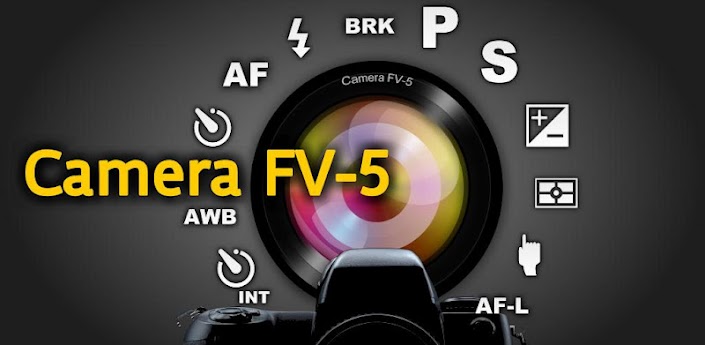
Overview: Camera FV-5 is a professional camera application for mobile devices, that puts DSLR-like manual controls in your fingertips.

This image has been resized. Click this bar to view the full image. The original image is sized 680x332px.
Tailored to enthusiast and professional photographers, with this camera application you can capture the best raw photographs so that you can post-process them later and get stunning results. The only limit is your imagination and creativity!
Major features:
• All photographic parameters are adjustable and always at hand: exposure compensation, ISO, light metering mode, focus mode, white balance and program mode.
• DSLR-like viewfinder display: see exposure time, aperture and stops display with EV and bracketing settings.
• Full fledged exposure bracketing: from 3 to 7 frames, unlimited stops spacing, plus custom EV shifting.
• Built-in intervalometer: make stunning timelapses (even bracketed/HDR timelapses) and time-controlled picture series.
• Program and Speed-priority modes.
• Long exposure support: take beautiful night photos and light trails with long exposure times up to 30 seconds*.
• JPEG as well as RAW (PNG**) image formats for lossless photo capturing, perfect for post-processing.
All camera functions assignable to volume keys. You can adjust EV, ISO, color temperature and more using volume keys. Devices with hardware camera shutter key are also supported.
• EXIF and XMP sidecar metadata support.
• Self timer for delayed shooting.
• Autofocus, macro, touch-to-focus*** and infinity focus modes, plus a focus lock switch (AF-L).
• Autoexposure (AE-L) and auto white balance (AWB-L) locks in Android 4.0+.
• In background photo developing and processing allows a smooth, uninterrupted camera operation.
• Digital zoom using multitouch pinch gesture. Also shows 35mm equivalent focal length!
This camera application completely avoids scene modes, instead you get full manual control over all photographic parameters, just like you do with a reflex camera, so you can ultimately control every aspect of the picture, and leave the post-processing to the computer. So after your DSLR, you will never miss a photo opportunity again, being able to capture it with the closer sensation to your DSLR as possible.
If you find a bug using the application, please, visit the web page http://www.camerafv5.com or write to support@camerafv5.com with your phone model name and the description of the problem, before writing a negative comment. Customer satisfaction is my priority, and I will try to fix it as soon as possible!
* Long exposures lowers picture resolution to 2 or 1 MP, depending models. The reason is explained here: http://www.camerafv5.com/faq.php#lon…ure-resolution
** Lossless PNG saving is a memory intensive operation. Some devices might need to raise the memory limit for Camera FV-5 to save PNG pictures. See the FAQ here: http://www.camerafv5.com/faq.php#png-memory
*** Touch-to-focus available for Android 4.0+ devices. Under Android 2.x, available only on Motorola, HTC and Nvidia camera drivers, plus some Samsung drivers and other phones.
What’s in this version:
- New: touch-metering support on 170 devices. To define the area, tap and hold on the viewfinder. You can drag the metering rectangle to move it.
- New: Serbian (Latin), Galician and Czech languages.
- Fixed: now selected exposure time in long exposure mode is shown on the viewfinder.
- Fixed:
This app has no advertisements
More Info:
Code:
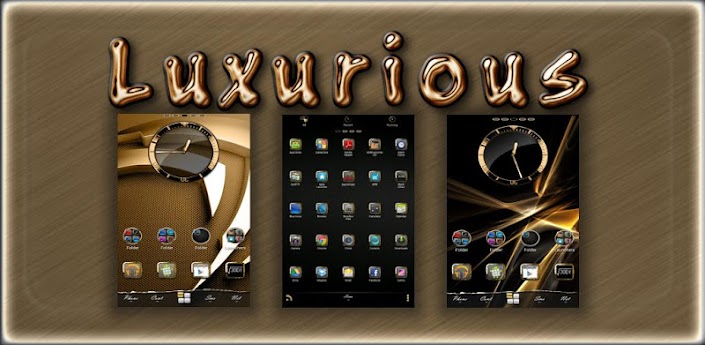
Luxurious Multi Theme v2.0

Luxurious Multi Theme v2.0
Requirements: Android 1.6 and up
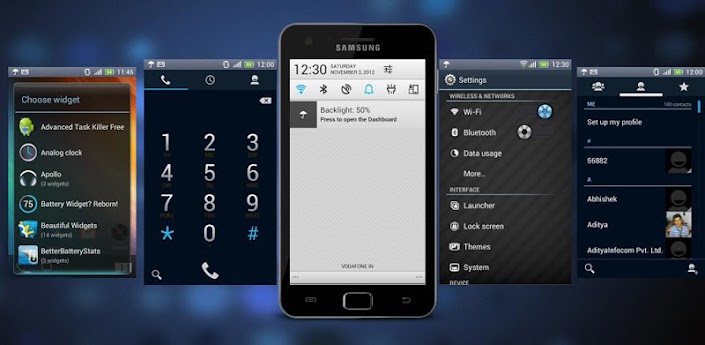
Overview: ★ This Theme will work for the following Launchers ★

This image has been resized. Click this bar to view the full image. The original image is sized 680x332px.
→ Luxurious Gold Theme
- Go Launcher EX 3.19
- Nova Launcher
- Apex Launcher
- ADW Launcher
- dxTop “Uses Icon Pack
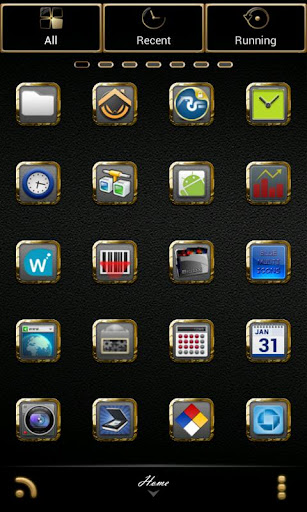
▼ WHATS INCLUDED ▼
Analog Clock Widget
Skinned Menu Icons
Go Default Search Widget
918 Icons in Icon Pack
10 Wallpapers w/ Wallpaper Picker
9 Dock Bars
▼ WHATS REQUIRED ▼
This theme will “open” on its own. It has many functions to control how theme is applied and allows user to provide feedback and communicate with me. You will still need to have GoLauncher installed to use all aspects of theme.
This Themes App will translate to the following languages
German, Chinese, Czech, Danish, Greek, French, Finnish, Hebrew, Hungarian, Italian, Korean, Lithuaniun, Norwegian, Polish, Portuguese, Russian, Ukranian, Swedish, Arabic, Spanish, Japanese
HOW TO USE WITH ADW ▬
Install/Run ADW.LAUNCHER, press Menu-ADWSettings-Themes Preferences. Select “Luxurious” and Apply Theme!
▬ If Screen Icons do not appear to be themed, double tap on the icon and choose edit then check mark the box that reads “Apply Theme Background” then choose OK.
▬ To customize the Drawer, double tap the drawer icon, select Edit → click on the icon → ADWTheme Icon Packs → Luxurious → Choose icon.
▬ To Change dockbar (ADW EX Only), go to ADW Settings->UI Settings → Main Dock → Dock Background → Custom… → Luxurious → Choose the one you like
▬ To Choose different wallpapers
Just press and hold home screen
Select wallpaper and choose Luxurious Wallpaper
▬ To change icons on home screen
Press and hold current icon on home screen then press edit. Select the button with the current icon, select ADWTheme IconPacks then select Luxurious. Choose the icon you would like
▬ HOW TO USE WITH GO LAUNCHER EX ▬
Install/Run GO LAUNCHER EX, press Menu-Themes.
Select “Luxurious” and Apply!
▬ To customize icons on dockbar or homescreens
Press/hold the icon, select replace->theme’s icon
▬ To Choose different wallpapers
Just press and hold home screen
Select wallpaper and choose “Luxurious”
▬ To Change dockbar, Press Menu → Prefrences → Visual Settings → Backgrounds → Dock Background → Go Theme Background… → Select the Dock you would like to use… Press Set Dock Background
▼ HOW TO USE WITH APEX ▼
Run Luxurious from App drawer and “Apply Apex Theme” or
go to Apex Settings/Theme Settings/ Select Theme.
▼ HOW TO USE WITH NOVA ▼
Go to Nova Settings, Look and feel, Icon Theme, Select Theme.
→ Special thanks to BigDX & DCOMOBILE
★ DESIGNED FOR HDPI. YOUR RESULTS MAY VARY WITH OTHER SCREEN RESOLUTIONS ★
What’s in this version:
- Updated Go Menu Icons and a few others
Please rate my themes: Thank you!
More Info:
Code:

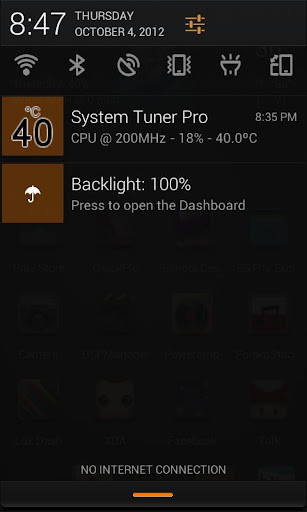
MIUI Dark Theme CM9/CM10 v1.2.0

MIUI Dark Theme CM9/CM10 v1.2.0
Requirements: 2.3 and up
Overview: Before refund or cancellation.
If U have Any Problem in xhdpi device Contact me so that i can fix it ASAP

[break]
Things that are themed:
Phone
Settings
Quick Reply
USB Connect/Disconnect
Status Bar
Notification Bar and Toggles
Camera
Power Menu
Drop down Menu
Amongst other tweaks here and there
What’s in this version:
v1.20
wifi and signal icon fixes for xhdpi devices
V1.15
themed contacts
themed MMS
and other fixes
v1.10
Fixed overscroll Glow
fixed H+,Edge and Gprs Icons
Changed Statusbar Notifications Background
and other fixes
v1.00
initiall release
This app has no advertisements
More Info:
Code:
Apex Theme – Sense 4+ v1.2

Apex Theme – Sense 4+ v1.2
Requirements: 2.0 and up
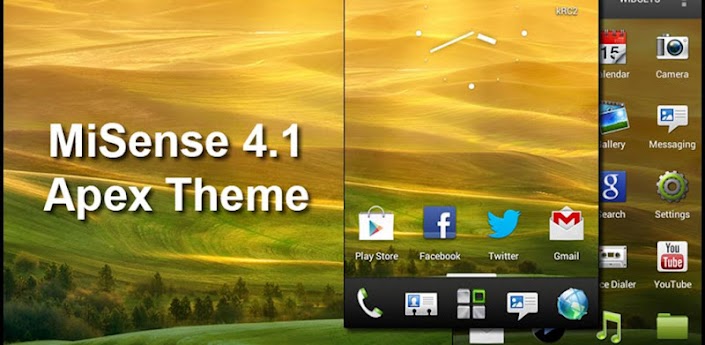
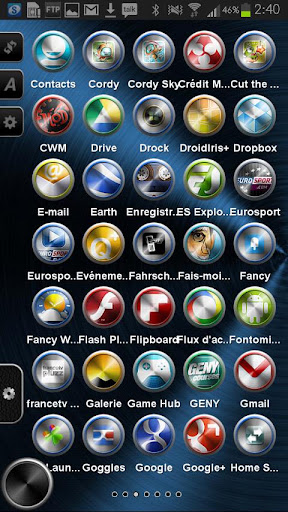
Overview: Sense 4+ Apex Theme

This image has been resized. Click this bar to view the full image. The original image is sized 680x332px.

[break]
This theme is based on the official HTC ROM Sense 4.1
Perfect combination of new HTC Sense 4.1 mobile phone colors, style and UI options.
Install Apex Launcher (Free or Pro)
–Install theme
–Open Apex Settings
–Open Theme Settings
–Select and Apply MiSense 4.1 Theme
This app has no advertisements
More Info:
Code

CM10.1/10 Theme Meizu v1.17

CM10.1/10 Theme Meizu v1.17
Requirements: Android 2.3+
Overview: THIS THEME STATUSBAR IS PORTED FROM MEIZU THEME FOR CM7 WHICH IS MADE BY ZDUNEX25@xda”http://forum.xda-developers.com/member.php?u=3141383″
SO Thanks To Him

This image has been resized. Click this bar to view the full image. The original image is sized 680x332px.

[break]
This THeme Now Support CM10.1 And Other Theme Chooser Rom THat Comes In Andrid 4.2 Supporting Both HDPI and XHDPI device
CM10 Meizu Theme for CM10 only for CM9 look for my other theme for Meizu CM9 only
Presenting My New Theme Based On Meizu OS For Cm10/AOKP/PARANOIDANDROID For HDPI/Xhdpi Devices Rom’s
NOTE Before Leaving negative comments or refunding Please Contact me If U have ANy Problem
Download the theme, go to settings/themes and APPLY THE SYSTEM THEME AND REBOOT. Now select my Theme & apply. You may get an error: ‘Sorry, this theme is missing assets for your device’s screen size’.
Ignore that and apply it anyway and REBOOT.
Fully Themed System Files
Themed:-Dark Contacts
Dark MMS
Dialer
Phone
statusbar
XDA
settings
ANd Lots More
NOTE Before Leaving negative comments or refunding Please Contact me If U have ANy Problem
Download the theme, go to settings/themes and APPLY THE SYSTEM THEME AND REBOOT. Now select my Theme & apply. You may get an error: ‘Sorry, this theme is missing assets for your device’s screen size’.
Ignore that and apply it anyway and REBOOT.
What’s in this version:
new Fixes and improvements
This app has NO advertisements
More Info:
Code

TSF Shell Theme Metal HD v1.0

TSF Shell Theme Metal HD v1.0
Requirements: 2.2 and up
Overview: Maybe icon look a litle small. Try to up the density.

[break]
I present my new theme Metal for TSF Shell.
- 1300 Metal icons
- 9 colored backgrounds icons used for icons not theme
- silver metal ui.
-9 icons cover used to set the same color for all icon
(tips: use the simple grey background icon to have a bigger icon.
-8 walpapper for each color
you can set this theme with one color or multi-color. Like you want.
theme for TSF Shell only.
This app has no advertisements
More Info:
Code:
CM10.1/10 Theme MIUI Brown v1.0.1

CM10.1/10 Theme MIUI Brown v1.0.1
Requirements: 2.3 and up
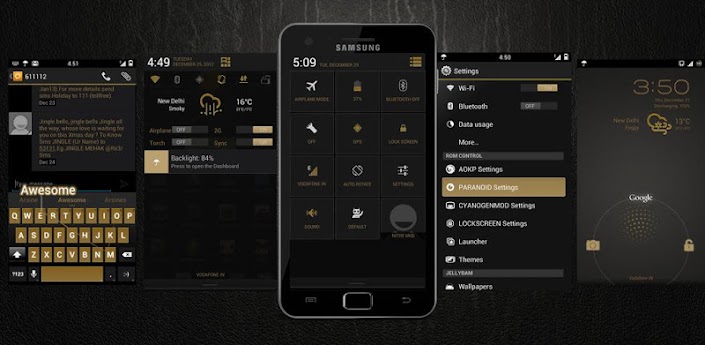
Overview: CM10.1/10 Theme MIUI Brown

This image has been resized. Click this bar to view the full image. The original image is sized 680x332px.

[break]
Now Support CM10.1 and other android 4.2 Rom’s that support theme chooser
PLEASE READ THE INSTRUCTIONS BEFORE LEAVING REVIEWS.
THIS THEME IS FOR HDPI AND XHDPI PHONES ONLY.
ROOT needed and a custom ROM like CM9/AOKP needed that supports the Theme Engine.
==========================================
INSTRUCTIONS:
Download the theme, go to settings/themes and APPLY THE SYSTEM THEME AND REBOOT. Now select my Theme & apply. You may get an error: ‘Sorry, this theme is missing assets for your device’s screen size’.
Ignore that and apply it anyway and REBOOT.
==========================================
i wanted to keep thinks simple as simple and minimal possible
so that it doesn’t looks so overrated and it looks beautifull and minimal Brown Theme
This app has no advertisements
More Info:
Code:

White Leather CM10/AOKP Theme v3.5.1

White Leather CM10/AOKP Theme v3.5.1
Requirements: Android 4.0+
Overview: !!**!! IMPORTANT **!!**
THIS THEME IS FOR ROOTED PHONES ONLY!
You must be running a ROM that supports the T-Mobile Theme Chooser Engine.
CM9/CM10/AOKP XHDPI Displays Only at this time

This image has been resized. Click this bar to view the full image. The original image is sized 680x332px.
!!**!! PLEASE READ **!!**
If you receive “Sorry, this theme is missing assets
for your device’s screen size” APPLY ANYWAY.
If you receive “Theme Error” please do not panic.
Simply revert to your original theme and restart your phone.
You will be able to apply after your restart.
Please note some theme aspects only apply after you restart your phone.
OK, onto the Theme Information!
Newly updated for Android 4.2.1!
What’s Themed:
* Phone
* MMS
* SystemUI
* Settings
* Swype Beta/1.3
* AOKP ROM Control
* Camera 4.1.2
* Calendar
* Contacts
* Calculator
* Google Now
* Google Play
* DeskClock 4.2
What’s new in this version:
Version 3.5
- Fixed Keyboard glitch
- Fixed Tapatalk
- Added percent to battery icon
- Added LiquidSmooth icons
More Info:
Code:
Code:

Blue Leather CM10/AOKP Theme v3.5

Blue Leather CM10/AOKP Theme v3.5
Requirements: Android 4.0+, ROOT
Overview: Theme for CM10/AOKP & Theme Chooser

This image has been resized. Click this bar to view the full image. The original image is sized 680x332px.
!!**!! IMPORTANT **!!**
THIS THEME IS FOR ROOTED PHONES ONLY!
You must be running a ROM that supports
the T-Mobile Theme Chooser Engine.
CM9/CM10/AOKP
XHDPI Displays Only at this time
!!**!! PLEASE READ **!!**
If you receive “Sorry, this theme is missing assets
for your device’s screen size” APPLY ANYWAY.
If you receive “Theme Error” please do not panic.
Simply revert to your original theme and restart your phone.
You will be able to apply after your restart.
Please note some theme aspects only apply after you restart your phone.
OK, onto the Theme Information!
Newly updated for Android 4.2.1!
What’s Themed:
* Phone
* MMS
* SystemUI
* Settings
* Swype Beta/1.3
* AOKP ROM Control
* Camera 4.1.2
* Calendar
* Contacts
* Calculator
* Google Now
* Google Play
* DeskClock 4.2
What’s new in this version:
Version 3.5
- Fixed Tapatalk
- Added percent to battery icon
- Added LiquidSmooth icons
More Info:
Code:
Code

Twitter Delicious Facebook Digg Stumbleupon Favorites More