Monday, 7 January 2013

Diagnosis Pro – System Information apk v0.8.2 download

Diagnosis Pro – System Information v0.8.2
Requirements: Android v2.2+
Overview: Know what Android does behind its back!
\"\"

Ever wondered what your Android is currently doing?
* On Windows we can open the task manager and get all the information we want.
* On Android it will suspend the app we are currently using, but what if we wanted information about that app?
* What if wanted to know if an app is currently downloading or uploading something? How much cpu is this app using?
* Is this app running out of memory?
* Is the battery getting too hot ?
* What apps are running in the background, at this moment?
* Did another app just start and cause lag?
* Why doesnt this app tell me how much battery i have left?
* Loosing track of time while gaming?
~~~| Know what your Android is doing! |~~~
Diagnosis can display system information at all times, even while using other apps.
When Diagnosis is turned on, small customizeable text is shown on screen giving you information of your choice.
There are various informations to choose from:
- Cpu use, Memory, active app, cpu speed
- Date, Time
- battery, voltage, temperature
- Network traffic (Upload per second, Download per second)
- Name of applications using >40% or 70% cpu
- And more…
Currently a total of 33 more general information items, plus another 33 items in the pro version, that are displaying very specific information.
If desired you can have the recorded information saved in a database for later access and statistical data as network traffic, avg cpu use etc.
~|It’s free and has no adds, so just give it a try.|~
There is a more extensive help file included in app (see settings>about).
I also respond fairly fast to emails, so just write me one if you have troubles or questions!
 
I have had some questions about the requested permissions, i have nothing to hide, so let me explain them:
* "Storage", so i can write the database to the sdcard instead of clogging up the internal memory
* "System tools", is needed to show the information ontop of the screen and keep the display on when loading data
* "Internet", is needed to send (anonymous) bug reports and display the network latency(Ping)
* "Network state", to be able to get cell signal strength information
* "Wifi state", to get wifi signal strength,name and ip information
* "Receive boot completed", is needed for the option to automaticly start Diagnosis on boot
Let me add some keywords to help people search:
dark3n,darken,system tool,system information,diagnostic tool,overlay,upload,download,diskstats,cpu use,memory use,cpu speed,running apps,taskviewer,systeminfo,onscreen info,system statistics,battery stats,battery,temperature,voltage
Recent changes:
v0.8.2(30)
- Small code rearrangement to fix a crash
v0.8.1(29)
- Updated translations
- Added Italian language
- Added targetApi to change menu button behavior
- Added path for sgs3
- Made some startup tweaks, to fix busybox errors
v0.8.0(28)
- Translation updates
- UI tweaks
- Performance tweaks to reduce memory footprint
- Fix for potential UI FC
- Updated ABS to 4.1
Visit Website
Less description »
Note: all pro features available. no key file needed.
This app has NO advertisements
More Info:
Code:

Battlefield BF3 Stats Premium apk v2.41 download

Battlefield BF3 Stats Premium v2.41
Requirements: Android v2.2+
Overview: Best looking and most complete BF3 stats app on the market! Designed for both phones and tablets. Stats and images are provided by Battlefield 3 Stats – All stats about BF3. NB! This is not an official app!

Best looking and most complete BF3 stats app on the market!
Designed for both phones and tablets. Stats and images are provided by Battlefield 3 Stats – All stats about BF3. NB! This is not an official app!
Buy Premium version to get rid of ads, access to last played server information, unlocked dogtags and option to change tabs order and disable individual tabs.
You can:
– View dogtags
– View global scores and stats
– View upcoming unlocks
– View kits, weapons, vehicles with stats and unlocks
– View assignments with progress
– View ribbons, medals (with progression towards next medals)
– View equipments with stats
– View rankings
– View server last played on
– Side-by-side player comparison
– Add multiple players with ease
– Add multiple widgets to home screen (one for each of your friends if you like).
– Change language through settings (multiple localization supported)
NB1! Images will be downloaded the first time they are needed. You may experience some delay before they are shown the first time.
NB2! Use player name, not origin id! (some other Battlefield 3 apps uses origin id)
NB3! Storing the app on SD-card will disabled the widget and the donation key might not work.
android.permission.GET_ACCOUNTS is needed for the coupon system. It uses your gmail address to verify coupon ownership.
Requires no login :) (not based on battlelog or origin)
Please contact me if you experience any problems
Translated to Arabic by Neoroify
Translated to German by Max Weitze
Translated to French by Snake076
Translated to Russian by Дядюшка ЧЕ
Translated to Dutch by MattNick13
Translated to Spanish by Luciano Mostaccio
Translated to Norwegian and Swedish by Luggruff
Translated to Italian by NemesEyes
Translated to Polish by Piotr Front
Translated to Brasilian-Portugese by Eduardo Villani
Translated to Turkish by FuBi75
Translated to Danish by Mads E.
Thanks to the guys at Battlefield 3 Stats – All stats about BF3 for providing free of use API :)
Disclaimer:
This app was not created or endorsed by EA/DICE. All images are owned by their respective owners, and Battlefield and Battlelog are registered trademarks of EA Digital Illusions CE AB. The stats and images are provided by Battlefield 3 Stats – All stats about BF3.
 
Recent changes:
2.41:
Fixed: Missing images of some accessories
Fixed: Progress bars for kits
Fixed: Missing recon service star
2.40:
Added: Vehicle and weapon description.
Changed: Reworked image caching for better performance.
Changed: Drastically reduced memory consumption.
Changed: New design of assignments tab.
Changed: New design of kits tab.
NB! All old, cached image will be wiped
Merry Christmas, enjoy the update!
Visit Website
Less description »
This app has NO advertisements
More Info:
Code:

GO Launcher EX apk v3.26 beta1 download

GO Launcher EX v3.26 beta1
Requirements: Android v2.1+
Overview: GO Launcher EX is the extended version of GO Launcher, one of the most popular home apps in Android Market. ItÂ’s a highly customizable home replacement application, which will run when you press your android phoneÂ’s HOME key. GO Launcher EX supports hundreds of themes, fast flip speed and tons of useful functions.

=About GO Launcher=
GO Launcher is the most popular home app in Android Market. It allows users to customize home screen, change themes, use smooth transition animation as well as various widgets and screen locks. It brings you a fresh and extraordinary mobile operation experience.
=Features=
– Thousands of personalized themes
– Various widgets and screen locks (weather, switcher, calendarÂ…)
– Extremely smooth transition animation
– Smooth flipping operation
– User-defined folder to easily categorize apps
Many options in preferences to help you customize you phone!
=Tips=
1. How to get themes, widgets and lockers?
a) Search ‘go launcher theme’, ‘go widget’ or ‘go locker’ in Android Market.
b) Use GO Store via menu button in GO Launcher.
2. How to set transition animation?
Use ‘Effects settings’ via button in GO Launcher.
3. Icons are too small?
Use ‘Icon Size’ option in ‘Preferences->Visual settings->Icons’ to make icons bigger.
3. Long press the app icon to enter editing mode on home screen and app drawer.
4. Glide up to open menu and glide down to pull down notification.
5. The widgets in the screenshots belong to GO Widget, attainable from Android Market or GO Store.
=Important=
1. GO Launcher is a totally free app without any charge.
2. If you cannot set ‘GO Launcher’ as the default home app, download ‘Home Manager’ to fix it.
3. ‘DIRECTLY CALL PHONE NUMBERS’ permission?
It’s required by the feature to create shortcuts of ‘personÂ’ and ‘direct dialÂ’. GO Launcher won’t make unattended phone call and cost your money.
5. ‘READ CONTACT DATA’ permission?
It’s required by the feature to create ‘person’ shortcut as well as to add contact folder.
Our commitments are respecting user privacy and delivering cool experience. Please help us by rating this app and recommending to the others.
Want an extreme makeover to your phone? Try it out!
Follow Us on
 
Owned by and Visit 3G.cn Through Your Mobile.
Copyright 2004-2011 All Rights Reserved.
Recent changes:
1.(New) Auto-named when creating new folders;
2.(Improve) The resize option of widgets;
3.(Improve) Reduce file size of the package;
4.(Fix) Allow to set icon name empty.
Less description »
Latest version: 3.26 beta1 (for Android version 2.1 and higher)
This app has no advertisements
More Info:
Code:

Network Signal Info Pro apk v1.80.1 download

Network Signal Info Pro v1.80.1
Requirements: 2.1+
Overview: “Network Signal Info Pro” provides detailed information on your currently used network, regardless whether you are using WiFi or a cellular connection.
\"\"
The Pro version (compared to the free version) has no ads, more widgets and a in the background running log function.
Now with widgets: 1×1, 2×1 and 2×2 in 3 different styles.
(If you can’t find widgets, please copy the app to phone memory)
I have especially worked on the visualization of the WiFi and mobile signal strength. They have received special importance. Normally they are only divided into weak, good and excellent signals. Graphically there are mostly "only" three to five bars shown as a mobile signal and three "waves" shown as a WiFi connection.
My app differentiates the signal strength into a total of 14 bars. This will give you a quick visualized and detailed information on your signal strength.
In addition to the more sophisticated graphical representation of the signal strength you will also be able to see some more interesting information.
 
Furthermore, there is a log function in csv-file format for wireless and mobile signal strength available (for e.g. Excel import).
With "Mobile Signal":
Network operators, sim provider, phone type, network type, network strength in dbm and ASU, data state, data activity, country code of the mobile phone, device ID, IP address (internal und external), roaming state.
In "WiFi signal":
WiFi-Name (SSID), BSSID, MAC address, maximum WiFi speed, IP address, external IP address, net capability, net channel, subnet mask, Gateway IP address, DHCP server address, DNS1 and DNS2 address.
What’s in this version:
Version 1.80.1:
– optimized widget battery consumption (IMPORTANT: please replace all widgets after update, otherwise problems can occur)
– new simple and clear widget-style added
– Settings menu added (widgets and main app)
– black and white bar option added
– Daydream screen added (from Android 4.2)
– many optimizations and bug fixes
Version 1.72.2:
– fix WiFi bug on some devices
– fix "Airplane-Mode" bug on some devices
– small optimizations
This app has no advertisements
More Info:
Code:

Sunday, 6 January 2013

FPse for android apk v0.11.75 download

FPse for android v0.11.75
Requirements: Android OS 2.1 +, Rooted, Google Play Store v3.10.10 Mod
Overview: FPse for Android is the fastest and most compatible PSone emulator for handheld devices.(also known as PSX or Playstation 1)
More than 200.000 active users and rated up to 4,5 stars on google play!
FPse is able to render PSone games in high resolution by using OpenGL which gives outstanding graphics!
Take a look to the Official Documentation to understand requirements and how it works:
http://www.fpsece.net/faq.html
Create an ISO image from your favorite games and enjoy playing them on your Android phone.
FPse features the following:
-High performance
-High compatibility
-High sound quality
-Real-time save states
-Audio track emulation (using .cue files)
-Force-feedback
-Dynamically loadable Overlay Pads
-Guncon emulation
-Analog Stick emulation
-Compatible with G-Sensor, Touchscreen and Hardware keys
-Supports .img, .iso, .bin, .cue, .nrg , .mdf and .Z disc image formats
-Full Support for IcontrolPAD, BGP100,Zeemote (via Bluez IME)
-OpenGL support via external plugin!
A few tips to improve your gameplay experience:
-in Landscape orientation DPAD and Main 4 buttons are activated, if you want to activate all others, go in menu/input/touchscreen and select others buttons.
-Create a default configuration by setting your desired options and then selecting “Default Config Save” in the System Menu.
-CALL, BACK, VOLUME UP/DOWN buttons can be assigned as PSone buttons but can be used is not assigned.
-Guncon emulation requires the A and B buttons to be mapped to Hardware keys. By default: L3 = A and R3 = B.
-SPUSync is required for proper sound quality in certain games such as MGS and FFVII.
-Frameskip set to 50 will avoid sound stuttering on load end device or with somes games that use much CPU.
 
What’s in this version:
FPse 0.11.75 changes:
- Fixed an immediate crash that happened on somes devices when latency was set by default
- Fixed SBI files support (FF9 Italian works now and more)
- Fixed Fixed Native gamepad support
- Fixed sound rendering, highly enhanced
This app has no advertisements
More Info:
Code:

Saturday, 5 January 2013

Blood Pressure Companion v1.3.1 apk download

Blood Pressure Companion v1.3.1 apk
Requirements: Android 2.1+
Overview: Allows you to record blood pressure values quickly and without much effort.
Allows you to record blood pressure values quickly and without much effort.
If you have experienced the consequences of high blood pressure or if you have seen them in a person close to you, you know how important it is to pay attention to your blood pressure. In addition to ensuring a healthy lifestyle and diet, regular monitoring and recording of blood pressure is essential. For people at risk of high blood pressure, this usually means measuring and recording their blood pressure levels at least twice a day. To have a real chance of sustaining this discipline, this regular blood pressure check needs to be integrated into daily life and made as easy as possible. One way to do so is by using the BloodPressureCompanion.
The BloodPressureCompanion ensures that you can record a measured blood pressure value quickly and without any effort. You can, for example, get a homescreen widget to quickly enter your latest values. The widget also shows you the last measured value or, if you prefer, the average of your measurements to date. The BloodPressureCompanion also gives you the opportunity to demand detailed information based on the type of blood pressure monitor or body position being used. It remembers all of your key measurements and can present them as a variety of different statistics. It has an export feature (PDF and text) that allows you to take the processed data to your next doctor‘s visit. You could also, if you chose, show the world your values or selectively share with family and friends.
Feature summary of BloodPressureCompanion:
- Quick recording of blood pressure values
- Graphical analysis and various statistics
- Export of blood pressure data and statistics as PDF or text file (available as In-App extension)
- Sharing of values with family members, friends, or the rest of the world
- Automatic acquisition of sleep length from the App ‘Sleep as Android’
This app has NO advertisements
Free Blood Pressure Companion v1.3.1 apk

Pocket Geometry v2.0.0 apk download


Pocket Geometry v2.0.0 apk
Requirements: Android 1.5+
Overview: Simple and easy to use geometry app that you can carry in your pocket!
Simple and easy to use geometry app that you can carry in your pocket!
Action price, just £0.50. Get it while it lasts!
Simple and easy to use geometry app that you can carry in your pocket!
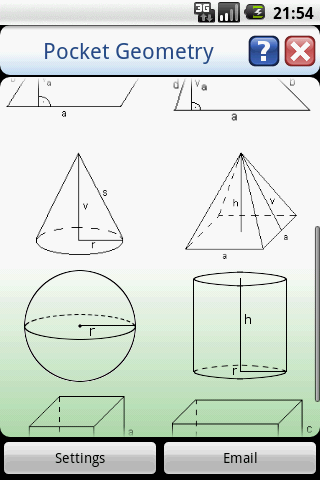
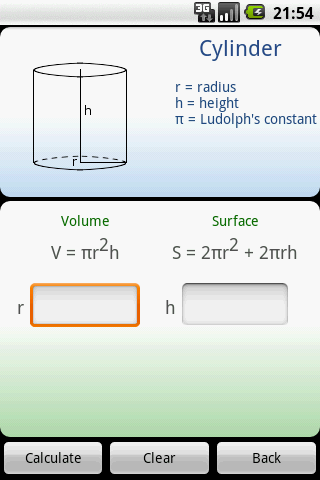
Calculate the perimeter, area, surface or volume of various geometric shapes.
Shapes includes 2D (square, rectangle, circle, triangle, trapezoid, parallelogram)
and 3D (cone, pyramid, sphere, cube, cylinder and rectangular prism)
PLEASE SEND ME AN EMAIL FROM APP IF YOU HAVE ANY PROBLEMS WITH IT. I CANNOT REPLY TO COMMENTS!
If you are willing to help me translate this app into your language, send me an email 
What's in this version:
2.0.0 - Option to copy only number
1.9.0 - Spanish translation thanks to Keiner
1.8.0 - Copy values when long-clicking perimeter, area or volume, Kindle Fire optimizations
1.7.0 - German translation thanks to Mario, Russian translation thanks to Nick
1.6.0 - Norwegian translation thanks to Dag
1.5.0 - Better Honeycomb support
1.4.0 - Italian translation thanks to Matteo
Free Pocket Geometry v2.0.0 apk

CM10.1 CM9 TouchWiz 5.0 theme v3.3.9 apk download

CM10.1 CM9 TouchWiz 5.0 theme v3.3.9 apk
Requirements: 4.0 and up
Overview: CyanogenMod 10, CyanogenMod 9 & AOKP Theme: TouchWiz 5.0 for the T-Mobile theme chooser
*******Problems while installing the theme?*******
- Theme is inproperly compiled error. Solution: Set system theme, reboot your phone, set TouchWiz theme
- When installing this theme, you may ignore the "Sorry, this theme is missing assets for your device's screen size." message! 
********************************************************
Designed for both HDPI and XHDPI devices!
Please have a look at this xda thread for instructions and feedback!
http://forum.xda-developers.com/showthread.php?t=1751952
[Themed non-system apps]
- Apex Launcher
- Nova Launcher
- Trebuchet
- Default launcher
- Apollo
- Google Music
- Android music player
- Poweramp
- Go Contacts EX
- Go Dialer EX
- exDialer & Contacts
- Root Explorer
- ASTRO Filemanager
- OI Filemanager
- ES File Explorer
- Solid Exporer Beta
What's in this version:
Check out my TouchWiz Apollo theme:
https://play.google.com/store/apps/deta ... o.touchwiz
v3.3.9
Themed keyboard
Improved dialogs
Improved Camera
Support for ADW Launcher EX
General improvements
This app has NO advertisements
Free CM10.1 CM9 TouchWiz 5.0 theme v3.3.9 apk

Smart Launcher Pro v1.0.5 apk download

Smart Launcher Pro v1.0.5 apk
Requirements: Android 2.1 and up
Overview: Smart Launcher is an innovative launcher characterized by a minimalist design, low memory usage and an user-friendly UI that let you start any application with a few taps.
It is currently the only launcher on the store to features automatic cataloging of installed apps!
This is the first version 
Features:
- Main screen with Quick Start
- Drawer organized by categories
- Ready to use without special configurations.
- Support for Live Wallpaper and screens of different sizes.
- Support of set of icons for Launcher Pro and ADW Launcher
What's in this version:
1.0.4 (minor release)
- Indonesian language;
- More drawer transitions;
- Possibility to select grid size;
- Better performance;
- Wallpaper bug fixed!
- Direct dial bug fixed.
- A lot of other bugfixes.
This app has NO advertisements
Free Smart Launcher Pro v1.0.5 apk

Color Splash Effect Pro v1.3.6 apk download

Color Splash Effect Pro v1.3.6 apk
Requipments: Android 2.1 and up
Description: Color Splash convert photos to gray and let you choose details in color.
Color Splash Effect lets you quickly and easily give photos a dramatic look by converting them to black and white, while keeping your chosen details in color. This effect draws the viewers' attention to the colored areas, creating striking images.
Most selective coloring apps give you 2 painting choices: Gray or original color. Color Splash Effect gives you this PLUS the ability to paint nearly ANY color!
The intuitive and responsive multi-touch user interface makes Color Splash Effect amazingly easy and fun to use. Use your finger as a brush to "paint" sections of your image black and white, or to bring back the original color. Zooming in and out using the two-finger pinching gesture allows you to work on details with pixel-accuracy.
Features:
- Share your edited images on Facebook.
- Save multiple sessions to resume your work later.
- Undo any number of accidental brush strokes.
- An alternative view mode highlights the regions that will remain in color with a red tint. This makes it easier to see and adjust the boundaries between color and black & white regions.
- Choose from 4 different brushes (hard or soft edged, opaque or transparent)
- Work in landscape or portrait orientation.
- Hide the toolbars in full screen mode.
- Optimized for tablets
- Pinch zoom(zoom with fingers)
- Scalable brush size
- Change colors of your photos
What is more than others
Provides highest resolution results.
Provides landscape and portrait mode.
Two different user interface designs, one for phones and one for tablets.
Tablet design provide more space for photos.
Most realistic color replace operation unlike other apps.
What's in this version:
12 new effects
Total 37 effects
New Adjustment tools
Contrast adjustment
Warmth adjustment
Brightness adjustment
This app has no advertisements
Free Color Splash Effect Pro v1.3.6 apk

Twitter Delicious Facebook Digg Stumbleupon Favorites More