Monday, 16 April 2012

Fitness Buddy 300+ Exercises v1.0 apk

Fitness Buddy 300+ Exercises v1.0 apk
Fitness Buddy : 300+ Exercises v1.0 apk
Requirements: Android 2.2+
Overview: This is the FREE version of the widely popular iOS and Android app Fitness Buddy w/ over 300+ exercises with detailed descriptions, animations and an assortment of workouts
This is the FREE version of the widely popular iOS and Android app Fitness Buddy w/ over 300+ exercises with detailed descriptions, animations and an assortment of workouts. Our FREE version already contains more content and features than all the other paid apps out there. Download for FREE and take a look! If you love it, download our paid version which contains 1700+ exercises, HD videos, body metrics tracking and much more.

Find out why gym goers are switching over to Fitness Buddy! With 1700+ unique exercises at your disposal, Fitness Buddy will revolutionize your training regimen. With this app, you will find the workout tracking process simple and easy in order to sustain your motivation and enforce your commitment to your fitness goals.

-- MAJOR FEATURES ---
✔ 1700+ unique exercises!
✔ 1000+ HD videos
✔ Comprehensive exercises for all major equipments including barbell, ez curl bar, dumbbells, kettlebells, resistance bands, medicine ball, machines, and stability balls
✔ Exercise categorization (core, lower body, chest, shoulders, back, arms, cardio)
✔ 4000+ exercise photos and animations (retina display resolution)
✔ Detailed exercise instructions and muscle categorizations
✔ Capabilities to add your own custom exercises and favorite exercises

User-friendly interface
✔ Quick and simple workout tracking
✔ Search bar to quickly find your favorite exercises

75+ workout routines
✔ Diverse repertoire of exercise routines including workouts for women
✔ Routines specific to your goals (build big chest, tone butt, lose weight, and more!)
✔ Routines specific to your equipment (resistance bands, kettlebells, bodyweight only, etc)
✔ Build your own workout routines

Body metrics tracking
✔ Track your body weight and metrics (chest, arms, thighs, etc)
✔ Graph your body progress
Excellent Support
✔ Quick email responses
✔ Frequent updates

And many other features for you to enhance your workout experience. You won’t be disappointed when you train hard with Fitness Buddy.

More Info:
https://play.google.com/store/apps/details?id=com.skyhealth.fitnessbuddyandroidfree&feature=search_result#?t=W251bGwsMSwxLDEsImNvbS5za3loZWFsdGguZml0bmVzc2J1ZGR5YW5kcm9pZGZyZWUiXQ..
Download Instructions:
http://www.MegaShare.com/4118343

HDR Camera+ v2.18 apk

HDR Camera+ v2.18 apk
Requirements: Android OS 2.2+
Overview: Capture high quality HDR images in full resolution
Capture high quality High Dynamic Range images:
- Full resolution
- Take HDR image in one tap
- HDR image fused and tone-mapped on device within seconds
- Don't have to be rock-solid while shooting
- Correct handling of moving objects and de-ghosting
- You can control tone-mapping parameters: contrast, micro-contrast, color vividness, exposure
- Save original exposure bracketed images
- Location tagging
- Shutter sound can be muted
- Support for Flash on/off/auto

Why HDR
------------
Real life scenes often have a wide range of light intensity, which cannot be captured by a camera. In a photo of such a scene the bright areas look washed out and everything in shadows is pictured as a black spot with no details. The HDR technique allows you to capture details in bright and dark areas and have them merged in a single photo.

HDR photography is widely adopted by professional photographers. Wouldn't it be nice to have an HDR in mobile phones?
The problem is that HDR requires taking several differently exposed images in series, which must be precisely aligned and then fused. In order to be usable for real life scenes, the HDR feature should include moving object detection and hand shake compensation to avoid or minimize the ghosting in the final image. That requires a lot of computational resources and makes a challenge even for professional desktop HDR software.

Almalence has brought its expertise in professional HDR software to mobile phones. Our HDR fusion algorithms compensate hand shaking and detect moving objects in the scene, suppressing ghosting artifacts. At the same time, the algorithms are quick enough to provide comfortable processing time on mobile devices.

What's in this version:
Important bug-fix: internal crash fixed causing intermittent non-processing/non-saving of some photos
by popular demand: re-designed icon
better processing: stability fixes, less noise
external sdcard mount locations added: /emmc /bootsdcard
alternative way of setting exposure for Qualcomm-chpiset phones (Vega Racer, Xperia's etc)
higher-quality jpeg compression
various minor fixes

More Info:
https://market.android.com/details?id=com.almalence.hdr_plus
Download Instructions:
http://www.MegaShare.com/4118767

Mirror:
http://rapidgator.net/file/4336076/h218.apk.html

Multi Mount SD-Card v2.14 Build 80 apk

Multi Mount SD-Card v2.14 Build 80 apk
Requirements: ROOT ACCESS NEEDED AND MANDATORY.
Overview: You go to your sdcard in your phone and PC simultaneously.
You go to your sdcard in your phone and PC simultaneously.
The changes are visible immediately.
Don't use Android mount
This application is a widget, but not only

DISABLE AUTO-MOUNT FROM ALL APP (ex: WinAmp)

• Auto mount on USB connection
• Choose what sd-card is mounted (for mobile with 2 sd-card)
• Hide notification after a delay
• Scan media on unmount
• Vibrate on un/mount
• Option to mount without check if usb cable is present
• Disable media scan

English, French, Russian (Vladimir), Italian (Luca T.), Danish (Rasmus B.), German (Flo), Polish (Kamil S.) you want your langage ? Send me an email

#2.14
• Fix for some devices

Note:
1. Install Multi Mount SD-Card, Don't run
2. Install LuckyPatcher
3. Run the LuckyPatcher you need Root your phone, long press Multi Mount SD-Card, choose Remove License Verification (Auto!)
4. Enjoy.

More Info:
https://market.android.com/details?id=com.rafoid.multimountsdcard.widget
Download Instructions:
http://www.MegaShare.com/4119081

Mirror:
http://rapidgator.net/file/4352220/m214.zip.html

Perfect Ear Pro v3.3d apk

Perfect Ear Pro v3.3d apkPerfect Ear Pro v3.3d
Requirements: Android 2.2+
Overview: An easy and fun tool that will help both professional musicians and those who consider music a hobby enhance their musical ear.

- 8 Exercise types
- Custom Exercises
- Scale Viewer
- Different instruments and guitar skins
- Improved and configurable user interface
- No ads of course

What's in this version:
More Chord Progression exercises
Transparent settings backup between devices
Performance fixes
Bugfixes
Custom mode for chord progressions and more chords for Chord identification coming next!

What's in this version:
Fixed Dorian mode bug
Fixed occasional crashes in Scale Viewer
Minor bugfixes
Fixed crashes in Chord Progressions custom mode
German translations for Chord Progressions

More Info:
https://play.google.com/store/apps/details?id=ru.exaybachay.pear
Download Instructions:
http://www.MegaShare.com/4119101

Mirror:
http://rapidgator.net/file/4353999/p33d.apk.html

Glass Widgets Full version v2.1.0 apk

Glass Widgets Full version v2.1.0  apk
Glass Widgets FULL v2.1.0
Requirements: Android OS 2.2 - 2.3
Overview: Yet another set of basic home screen widgets.
This package contains:

* Glass Clock Widget (with weather)
* Glass Calendar Widget
* Glass News Widget (RSS feeds)

They are designed to provide you with the most important information at a glance, yet still allow you to enjoy the sight of your (Live-) wallpaper. Less is more

Full version include:

- Adjust Background Color (and transparency)
- Adjust Text Color (and transparency)

What's in this version:
v2.1.0
Google is now sending me an email each time a user asks for a refund. There's no info on who cancelled or why, and Google handles all the transactions, so it's only noise. But it does give me an incentive to improve
There's a new locked option under Appearance called Display Options. You can use it to hide the left panel or display alternate content (for the clock widget)

More Info:
https://market.android.com/details?id=dk.nicolai.buch.andersen.glasswidgets
Download Instructions:
http://www.MegaShare.com/4119120

Mirror:

Bluetooth File Transfer v5.10 Ad Free

Bluetooth File Transfer v5.10 Ad Free
Bluetooth File Transfer v5.10 (Ad-Free)
Requirements: Android OS 1.5+
Overview: Bluetooth File Transfer (OBEX FTP and OPP) for Android
Use your smartphone to browse, explore and manage files of any Bluetooth ready device, using File Transfer Profile (FTP) and Object Push Profile (OPP): you can also receive files and send contacts!

GUIDE> absolutelyandroid.com - de beste bron van informatie over absolutelyandroid. Deze website is te koop! (by Absolutely Android)

FEATURES>
* Custom security manager for incoming BT connections: only authorized devices can connect, if you accept. If you refuse, no access is granted on your servers: personal data files and privacy are safe against hacker, nerd, geek and guru (enanched Bluetooth server security is disabled by default)

* 3rd party applications can open (or pick) files from sdcard using this package like attachment, music, pictures or any multimedia file (no external intents are supported for performance purpose)

* Support for legacy 2.0 and AES (128, 192 and 256 bit) encryption (both pack and unpack) of Zip files (like WinZIP or WinRAR) - keep private document secure using a long pass to protect it

* Enhanced all-in-one app with the fastest file browser ever seen (you can verify by yourself, test it now)

* Professional, clean and fast UI where you can customize any aspect of the file viewer. Customizable user interface in order to best fit your needs (expert only)

* Thumbnails for APK, audio, video, image (also inside archive files: Zip, GZip, TAR) - thumb picture (miniature) not stored on cell phone memory

* It can connect to new and old cellphone: nokia, samsung, lg, sony (Android does not support infrared IR pan)

* Search files also inside Zip, GZ, Tar (advanced searching inside archive can take double time to complete)

* Improved contact send function in order to manipulate telephone numbers on generated VCARD (vcf) files

* Cut, copy, move, paste, delete multiple items using the integrated explorer of this application

* You can full unhide (or hide) hidden media (both smartphone and sd memory)

* OBEX layer (obexftp and obexopp) entirely developed by Medieval Software

* Compress, uncompress and extract Zip (encrypt with password), GZip, Tar

* Cleaner program settings view using shortcut icons pane

* Sharing: you can share a single file or an entire path

* Powerful bookmark feature with precise sorting

* Contact send screen supports contacts groups
* Test and check archive integrity (deflate)
* Desktop folders shortcuts
* Calculate MD5 and CRC32
* Power saving management
* Streaming service
* No root required
* Multi language
* Multiselect
* Home folder
* File sort
* Open as

What's in this version:
Version 5.10:
Added Hebrew language;
Added Arabic language;
Minor bug fixes.

Note:
No ads.
NOTE - SDPD (uuid port route) may not work on Android 1.5 and 1.6 so friend services could not reach you!

More Info:
https://play.google.com/store/apps/details?id=it.medieval.blueftp
Download Instructions:
http://rapidgator.net/file/4367346/b510af.apk.html

Mirror:

MX Video Player Pro v1.6b Proper apk

MX Video Player Pro v1.6b Proper apk
MX Video Player Pro v1.6b Proper
Requirements: Android version 2.1 and higher, supports App2SD
Overview: MX Video Player - The best way to enjoy your movies.
<Key Features>

a) MULTI-CORE DECODING - MX Video Player is the first Android video player that performs multi-core decoding. According to the test results on dual-core devices, it shows up to 70% performance improvement than single-core devices.

b) CPU OPTIMIZATION - Provides highly optimized Codecs and Rendering Engines for the processors including ARM® NEON™ and NVIDIA® Tegra™ 2.

c) PINCH ZOOM - Easily zoom in and out by pinching and swiping across screen.

d) SUBTITLE SCROLL - Scroll on subtitle text and playback position will be adjusted to match previous or next subtitle timing.

e) BETTER SUBTITLE READABILITY - Increased subtitle readability with thicker border and shadow around text.

f) ANDROID 4.0 - Fully supports Android 4.0 Ice Cream Sandwich.


<Subtitle Formats>

- DVD, DVB, SSA/ASS Subtitle Tracks.
- Sub Station Alpha(.ssa/.ass) with full styling.
- SAMI(.smi/.sami) with ruby tag support.
- SubRip(.srt)
- MicroDVD(.sub/.txt)
- SubViewer2.0(.sub)
- MPL2(.mpl/.txt)
- PowerDivX(.psb/.txt)
- TMPlayer(.txt)

******
Sometimes license checking could fail on the first run.
It typically happens when current time or time zone settings are incorrect, or Internet connection is unavailable. Please check the time setting and Internet connectivity.
******
If you can't buy from Android Market, please check our home page. We support more payment methods. (https://sites.google.com/site/mxvpen/buy)
******
About "modify battery statistics" permission: MX Video Player displays current battery state while playing video. To do this permission to read battery state is required. However Android does not distinguish between reading battery state permission and writing battery permission. This is why, despite battery state is only being read, permission to write battery state is required.
******
About "System Tools - display system-level alerts" permission: This permissions is required to block HOME key when input blocking is activated on video playback screen.
******
KRW 6,000 is about USD $5-$6.
******

What's in this version:
(1.6b) Fixed network play error
Added font folder selection menu on the settings window.
Added an option to ignore font specified on SSA script but use default font instead.
Added an option to disable folder/video editing menu.
Added SSA subtitle display size scaling option.
Improved S/W audio processing.
Improved slowing down problem when internal subtitle is used.
Fixed subtitle HTML color tag handling problem.
Fixed subtitle loading error related to internal subtitle.

Credits to zealot01,
This version won't check the license, and it works on flight mode or online mode.

More Info:
Code:
https://play.google.com/store/apps/details?id=com.mxtech.videoplayer.pro
Download Instructions:
MX Video Player Pro v1.6b
http://www.MegaShare.com/4119374

Mirror:
http://rapidgator.net/file/4383598/v16bc.apk.html

NOTE:
You don't need to install an extra codec package unless MX Player asks to do so on its first run.
Please don't download extra codec package from Google Play, download codec from below links.

MX Player Codec (ARMv7 NEON)
http://rapidgator.net/file/4386054/f...v1_6a.apk.html

MX Player Codec (ARMv7)
http://rapidgator.net/file/4386347/f...v1_6a.apk.html

MX Player Codec (ARMv6 VFP)
http://rapidgator.net/file/4386996/f...v1_6a.apk.html

MX Player Codec (ARMv6)
http://rapidgator.net/file/4386983/f...v1_6a.apk.html

MX Player Codec (ARMv5)
http://rapidgator.net/file/4386990/f...v1_6a.apk.html

PlayerPro DSP pack v3.0 apk

PlayerPro DSP pack v3.0 apk
Requirements: Android 2.0+
Overview: The ultimate music player for Android. PlayerPro DSP pack is a free digital sound processing plugin for PlayerPro. PlayerPro is an advanced music player for Android devices (2.0++).
The DSP pack is required for Android versions prior to 2.3 as there is no support for Audio effects in those versions (Eclair and Froyo).

For 2.3 and later devices, PlayerPro uses by default the built-in Android audio effects. It is thus not mandatory to install the DSP pack. Nevertheless, you may still want to try out the DSP pack for the following reasons:
- You might find the quality of the audio better than the native Android one.
- The performance of the decoding might be superior to the Android one for some or all music formats.
- The DSP pack might be able to playback some files that the Android native pack fails to read.
- The DSP pack offers a 10 band equalizer whereas the Android native audio effects only offer a 5 band equalizer.


INSTALLATION INSTRUCTIONS:

* From PlayerPro, go to Settings > Audio > Download DSP pack.

* Once installed, activate the audio pack via Settings > Audio > Activate DSP pack option.

* Restart PlayerPro for the changes to take effect.

* The equalizer settings are available via the option menu and on the default player screen.

* Adjust the audio buffer if you experience playback skipping (old/less powerful devices): Settings > Audio > Audio buffer. Larger buffers should reduce skipping.


IMPORTANT NOTICE:

PlayerPro relies on the Android media scanner and media store for playback. This means that it will only play music files that are natively supported by your phone, even if it supports a wider range of media codecs (ogg, flac, wavpack etc). Support for custom media files will be added in a future release.


DSP PACK FEATURES:

* Supports all common formats: mp3, mp4, m4a, wma, ogg, wav, aac, flac, wavpack.

* 10 band graphic equalizer with 15 default presets

* Customizable presets: create, edit, rename, delete ...

* Preamp control

* Bass boost control

* Volume control

Supports armv6 and armv7 (NEON) devices. Optimized for NEON devices.

Recent changes:
DSPPack V3.0:
new icon and welcome screen
gapless playback
auto/manual crossfade
option to only crossfade when shuffling
option to adjust auto/manual crossfade time
added virtualizer control for Android > 2.3 phones
bass boost effect enhancement
ability to adjust audio buffer
ability to adjust playback priority
improved smoothness of the seekbar
various bug fixes

More Info:
Code:
https://play.google.com/store/apps/details?id=com.tbig.playerpro.soundpack
Download Instructions:
http://www.MegaShare.com/4120391

Mirror:
http://rapidgator.net/file/4466992/DSPPack_3.0.apk.html

PlayerPro Music Player v2.40 apk


PlayerPro Music Player v2.40 apk
Requirements: Android OS 2.0+
Overview: PlayerPro: skins, artist/album information and art, grid/list views, lyrics ...
PlayerPro is an advanced music player for Android 2.x devices.
Key features:
* Browse and play your music by albums, artists, genres, songs, playlists, folders, and album artists.
* Video browser and player.
* Automatically downloads missing album artwork, artist pictures and genre illustrations.
* Manually pick your preferred album artwork, artist pictures, genre illustrations from the Internet, the Gallery app, ID3 tags, or album folder.
* Change the user interface of the Player by installing one of the 14 available SKINS, all for free.
* Customize the layout, chosing between GRID or LIST views.
* Read album and artist REVIEWS.
* Download, search and and save LYRICS to your music files using standard ID3 tags.
* Single and group TAG EDITING: title, album, artist, track, year, genre, comment. Formats supported: mp3, ogg, flac, wma, wav, m4a, mp4.
* Mixable AUDIO EFFECTS for Android >2.3 devices: 5 band graphic EQUALIZER with default/customizable presets (edit, rename, delete), STEREO WIDENING effect (virtualizer), REVERB effects (large hall, medium hall, plate, small room, medium room, large room), BASS BOOST effect, volume control.
* Free additional DSP PLUGIN for Android <=2.2 or >=2.3 devices: 10 band graphic EQUALIZER with 15 default/customizable presets, PRE-AMP control, BASS BOOST control, volume control. Go to Settings > Audio and select "Download DSP pack" option to install the free plugin.
* Dolby and SRS sound effects for HTC devices equipped with HTC sound enhancement (HTC desire HD, etc).
* Music stats and SMART PLAYLISTs: RATINGs, play/skip counts, last played, last added.
* Import and export music history and ratings from your favorite desktop music player: Songbird, Winamp, Wmp, MediaMonkey, Music files.
* Music folder selection.
* Choice of 2 LOCK SCREEN widgets with many customization options: unlock slider, sound toggler, skip tracks using volume buttons, swipe gestures ...
* Choice of 5 different home screen WIDGETs (4x1, 2x2, 3x3, 4x4, 4x2).
* Supported SCROBBLERs: Simple Last.fm, Scrobble Droid, Official Last.fm app.
* SLEEP TIMER with fade out.
* SHARE text notifications, album/artist artwork on your favorite social networks: Twitter, Facebook, Gmail, Picassa etc.
* HEADSET support. Customize long press and double/triple press actions.
* Library wide SEARCH. VOICE search support.
* SWIPE gestures (player: swipe album art to skip songs, browsers: swipe left to play next, swipe right to play last).
* SHAKE IT feature: give your phone a shake to play next/previous song (e.g.: shake top to bottom or bottom to top to play next/previous song).
* Create playlist SHORTCUTS.
* APP2SD support.
... and many other features to discover !

What's in this version:
DSPPack v3.0: new icon and welcome screen, gapless playback, auto/manual crossfade, option to only crossfade when shuffling, option to adjust auto/manual crossfade time, added virtualizer control for Android > 2.3 phones, bass boost effect enhancement, ability to adjust playback priority, improved smoothness of the seekbar, various bug fixes
Notification status enhancements and bug fixes
Bluetooth AVRCP 1.3 for CyanogenMod ROMs ONLY
New help screen design
Few bug fixes

More Info:
Code:
https://market.android.com/details?id=com.tbig.playerpro
Download Instructions:
PlayerPro Music Player:
http://www.MegaShare.com/4120399

Mirror:
http://rapidgator.net/file/4463667/pp240.apk.html

PlayerPro DSP pack:
http://www.MegaShare.com/4120391

Mirror:
http://rapidgator.net/file/4466992/DSPPack_3.0.apk.html

PlayerPro Widget Pack:
http://www.MegaShare.com/4120388

Samba Filesharing v111107m apk

Samba Filesharing v111107m apk 
Samba Filesharing v111107m apk
Requirements: Android 2.0.1 and up rooted
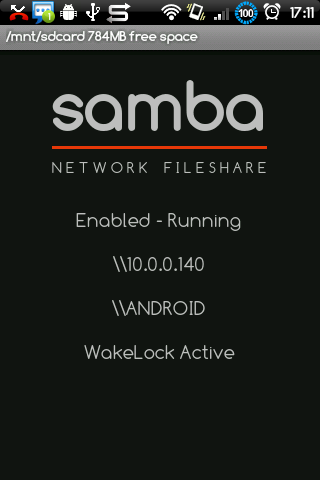
Overview: Access your Android device over wifi as a Windows shared folder.


* Samba filesharing server for Android.
* Your Android device becomes visible to other Windows (& SMB compatible) computers on your network.
* The 'external' storage in your Android device is accessible as a network shared folder.
* Copy files and folders to and from your Android device using drag and drop.
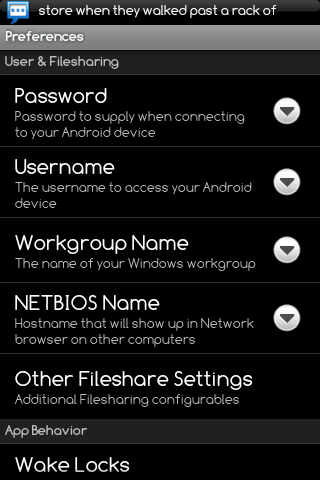
* Customizable username, password, Windows workgroup name, and device network (NETBIOS) name.

Notes:
* On the first run, make sure you catch the SuperUser Auth request to allow the Samba Filesharing app root access.
* If an update from an earlier version fails, try a full uninstall (either from the application manager of your Android device, or the file sharing app 'Menu -> Settings -> Uninstall' option), then re-install from Android Market.
* If you experience problems accessing your device, be sure to try all three methods: Network browser, specifying \\name, then \\ipaddress.
* HTC owners: Due to a bug in the wifi setup utility (supplicant) in some HTC Android releases, your device may not appear in Windows Network Browser or be accessible as \\name. Access using \\ipaddress instead.
* You may see 'com.funkyfresh.samba' remain in the Android process list even though you have disabled it from auto-starting. This is normal - whenever the WIFI interface transitions up/down the app needs to run temporarily to check its settings as to whether it should start/stop the filesharing server, after that, its done. Android will kill the inactive process if your device is running low on memory, otherwise the process remains inactive in memory for faster loading next time you launch it.

What's in this version:
Wifi Whitelist lets you limit which Wifi Access Points filesharing will start on.
Bugfix for new bug with second shared folder selection that appeared in 111106.
Fixed JCIFS client connection problem.
Fixed crash problem on Droid Bionic.
Improved wifi tether / hotspot mode operation.
Pressing ‘samba’ logo toggles between Enabled / Disabled mode.
Bug fixes relating to shell & SU access.
Additional configurables.

More Info:
https://market.android.com/details?id=com.funkyfresh.samba
Download:
http://rapidgator.net/file/4477117/S...1107m.apk.html
http://turbobit.net/t3kh3ggwqlhm.html
http://extabit.com/file/2dvfoobmspl54/

Twitter Delicious Facebook Digg Stumbleupon Favorites More